

If you work with industrial machinery, you’ve probably run into times when you need short, controlled bursts of motion from a 3hp VFD three-phase system—whether for testing a conveyor, jogging a pump into alignment, or fine-tuning a packaging machine’s feed. As a supplier of these systems, I’ve helped dozens of technicians and maintenance teams work through the jog function setup, and while it sounds straightforward, there are a few critical steps that prevent misconfigurations, overcurrent trips, or premature component wear. This post is rooted in hands-on experience with 3hp three-phase variable frequency drives (VFDs), plus insights from supporting customers with higher-horsepower systems like the 100 Hp VFD Drive and mid-range models like the 7.5 Kw Inverter Drive (which shares core jog logic with our 3hp units). By the end, you’ll have a step-by-step process that avoids common pitfalls and works reliably for most three-phase applications.
First, let’s define what a jog function is in this context. Unlike standard VFD operation, which ramps continuously to a target speed and holds it, jogging is for short, low-speed bursts (usually 10–50% of the VFD’s full rated frequency) that let you move a load incrementally. For a 3hp three-phase system, this is perfect for tasks like aligning a motor coupling, adjusting a belt tensioner, or positioning a part on a manufacturing line—where full-speed operation would be too fast or risky.
Before diving into wiring and programming, start with pre-setup checks that I never skip, even for experienced technicians. The biggest mistake I see is skipping these and jumping straight to programming, only to realize later that supply voltage or load incompatibility is causing issues. First, confirm your VFD’s input and output wiring matches the 3hp three-phase specs. Our 3hp VFDs are designed for 230V or 460V three-phase input, but double-check that your power supply is consistent—mismatched voltage will cause the VFD to trip on overvoltage or undervoltage during jogs. Next, verify the motor nameplate data: full load current, rated frequency (usually 50Hz or 60Hz), and rated speed. For a 3hp three-phase motor, full load current is typically around 8–9A for 230V and 4–5A for 460V; entering the wrong current in the VFD’s motor parameters is the #1 cause of jogging-related trips. Also, make sure your load is manageable: if you’re jogging a 3hp motor attached to a gearbox that’s seized, the VFD will draw excessive current and shut down, so free up the load first. If you’re moving to a higher-horsepower project later, our line includes options like the 5hp VFD Single Phase Input (great for power-limited sites) and 10 Hp VFD for larger loads, but for now, stay focused on matching your load to the 3hp unit’s rating.
Next, physical wiring for the jog function. Most modern VFDs, including our 3hp three-phase models, use a digital input terminal for jog control—this means you’ll wire a momentary pushbutton (a spring-loaded one, so it only activates when pressed) between the VFD’s common terminal (usually labeled COM) and a designated jog terminal (often JOG, FWD-JOG, or a programmable digital input like DI5). Critical here: never use a maintained toggle switch for jog control—momentary is non-negotiable, because you want the jog to stop immediately when you release the button. I also recommend adding a standard NEMA-rated pushbutton enclosure to avoid accidental contact with the wiring, especially in industrial settings where dust or moisture is common. A quick note: if you’re using the jog function alongside forward/reverse control, make sure the jog terminal is not set to conflict with the FWD/REV terminals; most VFDs let you assign separate functions, but double-check the terminal diagram in your 3hp VFD manual (our digital manuals are available on the product page for quick reference).

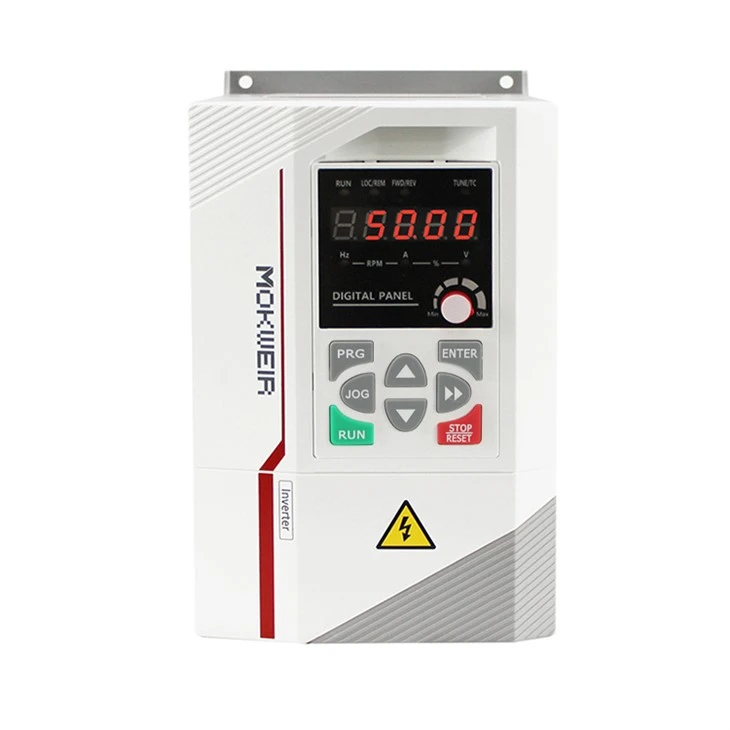
Now, the programming steps—this is where most people get tripped up, because jog parameters are often hidden in sub-menus and require specific settings to work correctly. I’ll walk through these step-by-step, using the common parameter structure for our 3hp three-phase VFDs (note that parameters may vary slightly by brand, but the logic is universal):
- Access the programming mode: Most VFDs require you to press a “Menu” or “Program” button, then enter a password (default is usually 0000 or 1234, unless it’s been changed by a previous setup). Avoid skipping this step—trying to adjust jog settings without entering program mode will only adjust the standard speed parameters.
- Locate motor base parameters: First, confirm your motor’s rated frequency and current. Navigate to the “Motor Setup” or “Motor Parameters” menu, enter the rated frequency (e.g., 60Hz for US applications, 50Hz for international) and full load current (from your motor nameplate). This is non-negotiable for accurate current limiting during jogs, when the VFD isn’t running at full speed but still needs to protect the motor.
- Set jog frequency: This is the core setting for the jog function. Navigate to the “Jog Settings” or “Jog Frequency” sub-menu. For most applications, a jog frequency of 10–25Hz works well for 3hp motors—too low (below 10Hz) and you’ll get torque issues, too high (above 30Hz) and the burst will be too fast for precise adjustments. For example, if you’re aligning a coupling, set it to 15Hz so you have controlled movement without rushing. Some technicians prefer to set jog frequency as a percentage of maximum frequency, but setting it to a fixed frequency is simpler and less error-prone for this use case.
- Set jog acceleration and deceleration: Another common mistake here is using the same acceleration/deceleration for jogs as for standard operation. For jogging, you want a much faster ramp time—usually 0.1–0.5 seconds—so the motor jumps to jog speed immediately when you press the button, and stops right when you release it. If you use a 5-second acceleration ramp for jogging, you’ll waste time waiting for the motor to move, which defeats the purpose of the jog function. Look for parameters labeled “Jog Accel Time” and “Jog Decel Time” and adjust them to the short range I mentioned.
- Assign the jog function to the digital input: Now you need to tell the VFD that when a signal is applied to the jog terminal, it should activate the jog settings instead of the standard speed. Navigate to the “Digital Input Setup” menu, select the jog terminal you wired earlier, and assign the function to “Jog Forward” (or “Jog Reverse,” if you want bidirectional jog). Important: make sure this is set for “momentary” activation, not “maintained”—a maintained signal would keep the jog function running until the switch is toggled off, which is unsafe for most applications.
- Test the setup safely: Before connecting the motor, do a power-up test. Turn on the VFD power, press the jog button—you should see the jog function activate on the VFD’s display, usually with a “JOG” indicator light. Now, turn off power, connect the motor, and do a low-voltage test first (if your VFD has a reduced voltage start function, use it here) to make sure the motor moves smoothly without tripping. If it trips on overcurrent, go back and verify the motor current parameter was entered correctly; if it’s too slow, increase the jog frequency slightly; if it doesn’t stop when you release the button, double-check that the input is set to momentary.
Once you have the basic jog function working, there are a few advanced tweaks that can improve reliability, especially for heavy loads or harsh environments. For example, many VFDs (including our 3hp three-phase units) have a “Jog Torque Boost” parameter—this increases output voltage during jogs to compensate for low speed, where motors typically have less torque. If you’re jogging a heavy load like a conveyor with accumulated material, setting torque boost to 5–10% will prevent the motor from stalling when you first press the button. Another useful setting is “Jog Inhibit” for applications where you don’t want jogging to work during normal operation—you can set a parameter that disables the jog function when the VFD is in “Auto” mode, which is a good safety feature for production lines.
As a supplier of three-phase VFD systems, I’ve seen customers cut corners on these steps and end up with VFDs that trip, motors that wear out early, or even safety incidents from unexpected movement. For example, a customer once skipped the momentary pushbutton and used a toggle switch for jog control—when a technician got distracted, the toggle switch was left in the jog position, and the motor ran unexpectedly. That’s why emphasizing momentary inputs and testing with the motor disconnected first is so important.
If you’re expanding your system to higher horsepower needs, our product line has options tailored for different applications beyond the 3hp unit. For single-phase input setups where three-phase power isn’t available, we offer the 5hp VFD Single Phase Input which works with 230V single-phase power to drive three-phase motors. For industrial applications with very large loads, our line includes the 100 Hp VFD Drive for heavy machinery, and the flexible 3 Phase Variable Frequency Drive line that fits everything from small pumps to large conveyor systems.
When you’re ready to implement the jog function on your 3hp VFD three-phase system, or if you have questions about matching the right VFD for your load, our team is here to help. Whether you’re troubleshooting an existing setup or designing a new industrial system, we provide technical support to make sure your VFD works reliably, with the jog function configured to your specific needs.
References
- Allen-Bradley Vector Frequency Converter Product Documentation: High-Performance Frequency Converters. (n.d.). Retrieved from the Allen-Bradley website.
- Electrical Installation Guidelines for Variable Frequency Drives, National Electrical Manufacturers Association (NEMA), 2021.
- Industrial Motor Control and Variable Frequency Drive Programming, McGraw-Hill, 2020.
- Safety Standards for Variable Frequency Drives, Occupational Safety and Health Administration (OSHA), 2022.